
Till: Debit Card for Kids
Till FinancialFinance
4.5318.00 Reviews
- Version
- 162.41.0
- Installs
- 100.00K
- Age Rating
- Everyone
Screenshots
Our Review of Till: Debit Card for Kids
 Analysis by Appyee
I judge a money app for children less by how polished it looks than by whether it can make ordinary spending a useful lesson without turning every purchase into a family debate. Till: Debit Card for Kids is built around that balance: parents manage the money side while children get a practical way to learn about earning, spending, and saving. That focus makes it more compelling than a basic allowance tracker, though it also means families should be comfortable bringing a payment card into the learning process.
How quickly it fits into family life
The best way to approach Till is as a shared routine, not a one-time download. A parent can use it to establish how allowance and chores fit together, then let a child make small choices within the family’s boundaries. Before relying on it for a particular purchase or weekly routine, I’d take time to understand the setup and agree on expectations together. The app’s value depends as much on those conversations as on its tools.
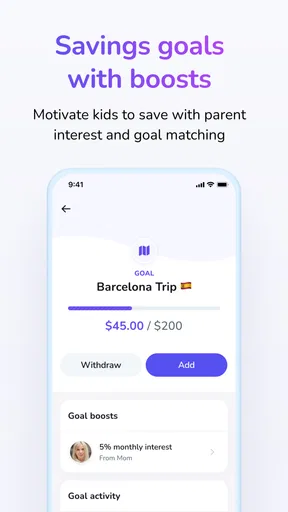
For a child who is new to managing money, keep the first goals modest. A small savings target can make the connection between setting money aside and eventually buying something concrete easier to grasp. For a parent, that also creates a natural moment to talk about trade-offs: spending now, saving for later, or earning more through agreed tasks. Those lessons are more useful when they connect to a child’s actual choices instead of feeling like a separate school exercise.
Speed matters most at the point of purchase
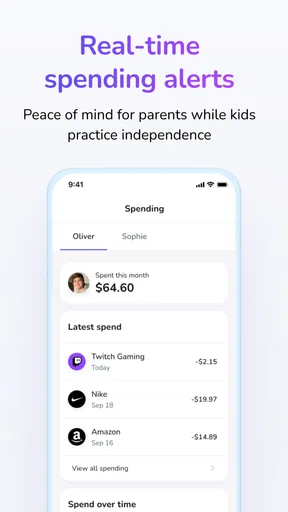
With a child-facing card, the important performance question is not whether every screen feels instant; it is whether the family can understand what happened when the card is used. Till’s transaction notifications are intended to keep a parent informed, which can help turn a purchase into a timely conversation. I would still treat an alert as a prompt to check in, rather than assuming that notifications replace reviewing the account or teaching a child to keep track of spending.
That distinction matters on a busy day. Imagine a child buying a snack after school and later asking whether there is enough left for a planned treat. A parent and child can use the app’s spending information as a starting point to talk through the decision. For a first-time user, it is sensible to test the family’s routine with a small, ordinary purchase before depending on the card for a time-sensitive need. The app can support the lesson, but it cannot make the child’s choice or explain it for you.
When family activity gets busy
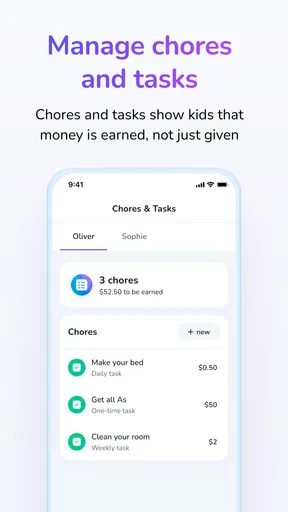
Chores, allowance, spending, and savings goals all touch the same basic question: what money is available, and what is it meant for? The useful workflow is to agree on the rules first, then use the app to reinforce them. For example, if a family links a task with a reward, decide together what counts as finished and when the reward is earned. That can prevent a money tool from becoming a source of disagreement about whether a chore was completed.
Parents should also consider how much oversight feels right for their child. Notifications and parental controls can support supervision, but a child who is ready for independence may respond better when adults explain what they are monitoring and why. I see that as a practical trade-off rather than a flaw: more visibility can reassure a parent, while too much checking can undercut the responsibility the app is meant to encourage.
Reliability is a routine, not a promise
A financial app has to earn trust through consistent habits. I would not make a child’s only access to spending money depend on one app or card, particularly during the early days of use. Keep a simple family backup plan for situations where a device, card, or account is not immediately available, and show the child how to pause before assuming a payment has gone through. That is sound money practice as well as sensible preparation.
If a card goes missing, the published app description notes an option to lock it in the app. That is a useful recovery step, but it is still worth discussing the family’s response in advance: who should be told, and what should the child do next? Rehearsing the steps calmly is more helpful than trying to invent a plan under pressure. I would avoid treating any digital control as a substitute for keeping an eye on account activity.
Choosing a device and a backup
Till is a finance app from Till Financial, and its current version is 162.28.6. It is listed for devices running Android 7.0 or later, so a parent should check the device’s system version before making it part of a household routine. A child may not need to use the parent’s phone at all times, but the adult managing the account should have reliable access to the device they use for oversight.
For families deciding between this and ordinary cash, a bank debit card, or a general allowance app, the difference is the combination of a child-oriented card and money-management activities. Cash is tangible and needs no app, making it a strong choice for younger children or families who prefer to keep lessons offline. A standard bank card may suit a teenager who already manages money confidently and does not need chore-linked guidance. A simple tracker can be enough when the goal is only to record allowance. Till makes more sense when parents want spending, earning, and saving to sit within one family learning routine.
Getting Started with Till
Setting up Till is like a walk in the park. Once you download the app, you’ll be prompted to create an account. This involves entering some basic details and linking it to your bank account. Don’t worry; they’ve got all the security protocols in place to keep your info safe. The user interface is sleek and straightforward, so even if you’re not tech-savvy, you’ll find your way around with ease.
Features That Stand Out
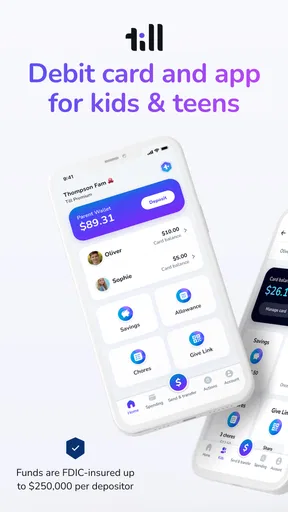
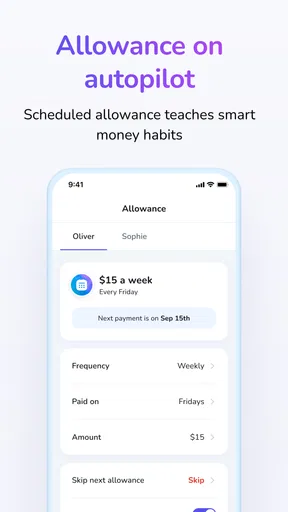
One of the coolest features of Till is the ability for parents to set spending limits and allocate allowances. It’s like giving your child a financial playground where they can make their own decisions but with a safety net. You can also set tasks and chores, linking them to financial rewards. It’s a neat way to teach kids the value of earning their money.
Besides, there’s a feature that allows kids to set savings goals. Whether it’s for a new toy or a gadget they’ve been eyeing, this encourages them to save and manage their finances wisely. I love how this instills a sense of responsibility from a young age.
Usability and Interface
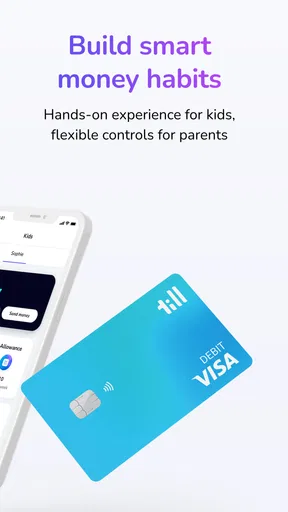
The app shines in its usability. The colorful, engaging design is perfect for kids while remaining functional for parents. The real-time notifications are a hit! They keep you in the loop about every transaction, so you’re never caught off guard. Plus, the customer support is responsive, which is always a big plus in my book.
Educational Value
Till doesn’t just stop at managing money. It also provides educational content tailored for different age groups. Through interactive lessons and quizzes, kids learn about budgeting, saving, and the importance of financial planning. It’s like having a financial literacy class right in your pocket.
Security and Privacy
In today’s digital age, security is paramount, especially when it involves our kids. Till uses state-of-the-art encryption to protect your data. It complies with all the necessary regulations to ensure your peace of mind. The app also offers parental controls, so you can oversee your child’s financial activities without being too intrusive.
Moreover, the option to lock the card directly from the app in case it’s lost is a comforting feature. It means you won’t have to stress about unauthorized transactions.
Room for Improvement
Now, no app is perfect, and Till is no exception. While it offers a plethora of features, I did find the notification settings a bit overwhelming at first. It took some tinkering to customize them to my liking. Also, while the educational content is rich, I feel they could add more videos or interactive elements to make it even more engaging.
Lastly, expanding their support for more banks would be a welcome enhancement, making it accessible to a broader audience.
Who is likely to get the most from it?
I’d recommend considering Till for a parent who wants to teach through supervised practice rather than handing over cash and hoping a child learns by trial and error. It is especially relevant when allowance is tied to regular responsibilities or when a child is saving toward a particular purchase. It may be less suitable for families who want a completely offline approach, or for a teenager who mainly needs an uncomplicated way to spend money and already has strong budgeting habits.
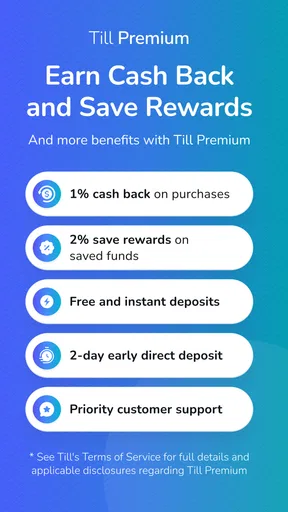
Before committing to a routine, families should check whether the financial arrangement and any costs work for them. The app is free to download, but it offers in-app purchases ranging from $6.99 to $69.99 per item. I would review the current purchase details before choosing anything, rather than assuming every part of the experience is included at no cost. Its Everyone content rating describes the app’s content suitability, not whether a child is ready to handle a payment card; that decision still belongs to the parent.
My performance verdict
Till has a 4.6 average from around 1.9 thousand ratings, with over 100 thousand installs, which suggests it has found an audience among families looking for this kind of guided money practice. Those figures are useful context, but they cannot tell an individual family whether the setup fits its banking habits or whether a child will engage with the lessons. I’d judge it by a short trial of the household routine: can the parent manage it comfortably, and does the child make more thoughtful choices?
Final Thoughts
Overall, Till: Debit Card for Kids is a fantastic tool for parents looking to introduce their kids to the world of finance. It’s a well-rounded app that combines practicality with education, making it a valuable asset in today’s digital landscape. If you’re looking to empower your kids with financial literacy skills, this app is definitely worth checking out. Go ahead, give it a try, and watch your kids grow into savvy spenders and savers.
Verdict
Strengths of Till: Debit Card for Kids
- Teaches financial literacy effectively.
- Parental controls are robust and easy to use.
- User-friendly interface for kids.
- Real-time notifications for transactions.
- Encourages saving habits with goals.
Limitations of Till: Debit Card for Kids
- Limited international usage options.
- Monthly fees may apply for certain features.
- No physical branch support available.
- Some features require parental approval.
- Lacks investment options for teens.
Similar Picks in This Category
View All
Google Wallet
Google LLC4.3

Airtel: Recharge, Bank & Loans
Airtel4.0

PayPal - Pay, Send, Save
PayPal Mobile4.2

DANA Indonesia Digital Wallet
PT Espay Debit Indonesia Koe4.5

Binance: Buy Bitcoin & Crypto
Binance Inc.4.8

Cash App
Block, Inc.4.7
Frequently Asked Questions
What is Till: Debit Card for Kids, and how does it work?
Till: Debit Card for Kids is an app designed to help parents teach their children financial literacy through practical experience. The app provides a platform where parents can set up a debit card for their kids, manage allowances, and track spending. It allows kids to learn about budgeting, saving, and responsible spending in a safe environment.
Is Till: Debit Card for Kids safe for my child to use?
Yes, Till is designed with safety as a top priority. The app includes parental controls, spending limits, and instant notifications to keep parents informed of their child's transactions. Personal information is secured with encryption, and the app complies with financial regulations to ensure user safety.
Are there any fees associated with using Till: Debit Card for Kids?
Till may charge certain fees for using their services, such as monthly subscription fees or fees for specific transactions. It is important to review the app's pricing details before downloading to understand any costs that may be incurred. Always check the terms and conditions for the most accurate information.
How can I set up and manage allowances using the Till app?
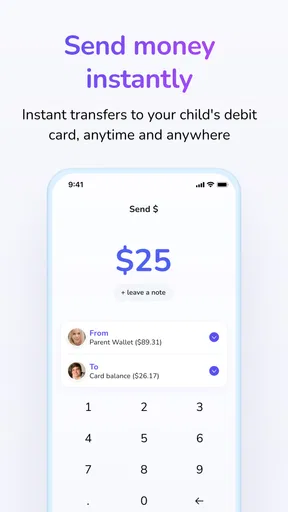
Setting up and managing allowances in the Till app is straightforward. Parents can set up regular allowance payments, assign chores with associated rewards, and even set savings goals for their children. The app allows parents to adjust these settings at any time to suit their family’s financial education needs.
Can Till: Debit Card for Kids be used internationally?
While Till is primarily designed for use within the United States, it’s important to check if international transactions are supported. Some features may be limited or incur additional fees when used abroad. Always verify with Till's customer support for the most accurate and up-to-date information regarding international use.
